
git@bitbucket.org:workspace/repository.git can stay in your Git config through this migration. OpenSSH can send the connection to ssh.bitbucket.org. That saves editing origin in every checkout, although each laptop, build agent, and deployment environment still needs its own configuration.
I prefer to put this change in ~/.ssh/config, where SSH decides how to reach the server, so one mapping can cover the existing bitbucket.org SSH remotes used by that account on that machine.
Host bitbucket.org ssh.bitbucket.org
    HostName ssh.bitbucket.org
    User git
Already have a Bitbucket block? Update that entry instead of pasting a duplicate, and keep your working key settings. Both literal hostnames on the Host line will use the settings below it, so existing remotes and direct connections to the new hostname can share the same configuration.
First, the actual migration dates
As of November 13, 2026, Atlassian's updated announcement says controlled brownouts for SSH access through bitbucket.org began on November 12. Final removal is scheduled for December 10, 2026. November 12 is the start of disruption, not the final shutdown date.
The destination for normal SSH access is ssh.bitbucket.org. HTTPS repository access continues to use bitbucket.org. This guide applies to Bitbucket Cloud and an OpenSSH client. A self-hosted Bitbucket installation has its own endpoints.
During controlled brownouts, a fetch through the old endpoint can still succeed between interruptions, so I check the effective SSH destination before treating a successful fetch as evidence that the migration is complete.
Put the change where SSH makes the connection
git remote -v
cat ~/.ssh/config
The mapping covers SSH remotes such as git@bitbucket.org:workspace/repository.git. HTTPS remotes are unaffected. Create the config file in ~/.ssh if it is missing. For an existing file, make a backup before editing and leave unrelated host entries in place.
mkdir -p ~/.ssh
chmod 700 ~/.ssh
# After creating or editing the config file:
chmod 600 ~/.ssh/config
Do not generate a new SSH key just because the server address changed. If your existing Bitbucket entry has IdentityFile, IdentitiesOnly, or other settings you intentionally use, preserve them. Merge any existing settings for the new hostname carefully. A hostname change does not require replacing the public key already registered with your account. If you already use altssh.bitbucket.org on port 443, keep that working destination. The default port 22 example above is not a reason to replace it.
Put the specific Bitbucket entry before a general Host * block, because OpenSSH usually uses the first value it obtains for a setting. Order matters. It does not choose the most specific match automatically, and IdentityFile is one of the settings that can accumulate multiple values. The OpenSSH configuration manual explains these rules, including how Include files participate in them.
Host is the name you ask for. HostName is where you go.
Git hands the hostname from the remote URL to SSH, which matches it against the names on the Host line and uses HostName ssh.bitbucket.org as the destination. User git selects Bitbucket's SSH account. Your workspace and repository path stay in the Git URL.
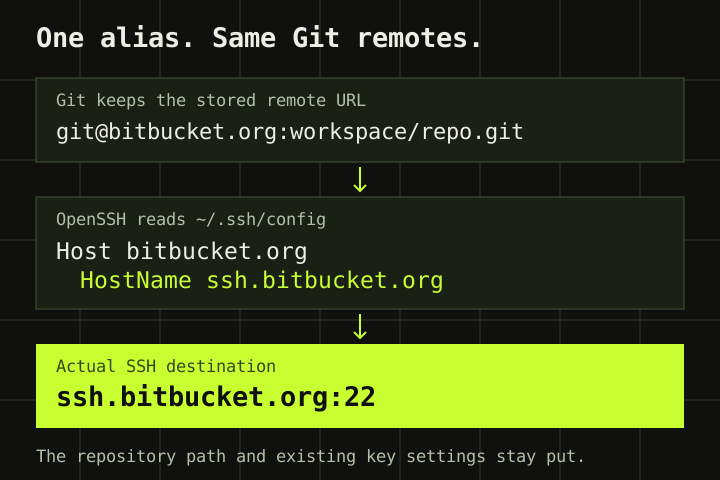 The repository URL stays familiar. OpenSSH routes the connection to the new hostname.
A remote such as git@bb-work:workspace/repository.git matches Host bb-work. The bitbucket.org block will leave that alias alone, even if its old HostName was bitbucket.org. Update the alias itself:
Host bb-work
    HostName ssh.bitbucket.org
    User git
    # Keep the existing IdentityFile and other account settings here.
Ordinary Host matching does not automatically restart against the substituted HostName. Check the host string in the remote and edit the block that handles it, keeping work and personal account settings separate when their aliases select different keys.
Verify the route, then verify the server
ssh -G git@bitbucket.org | grep -E '^(hostname|user|port|identityfile|identitiesonly) '
ssh -G git@ssh.bitbucket.org | grep -E '^(hostname|user|port|identityfile|identitiesonly) '
Look for hostname ssh.bitbucket.org, user git, and port 22 for the normal setup, checking both names to catch competing existing blocks. Review identityfile and identitiesonly against your existing key setup. For an alias, substitute git@bb-work. These commands show the configuration SSH will use, without authenticating or proving network access.
ssh -T git@bitbucket.org
git ls-remote origin
The new hostname may need a new known_hosts entry even though Atlassian says the SSH host keys are unchanged. Before accepting a first-connection prompt, compare the presented fingerprint with Atlassian's official SSH host key fingerprints. The official announcement also points to https://bitbucket.org/site/ssh for host key records. Fetching a key with ssh-keyscan alone does not establish that it belongs to Atlassian.
Bitbucket's SSH test can report successful authentication and still say shell access is disabled. That message is expected for this endpoint, and the repository check confirms the authenticated account can read this particular remote without pushing a commit.
One machine's config does not migrate your CI
The file belongs to the account running SSH. A local fix does not update a Jenkins agent, deployment server, container, or another developer's laptop. Apply the mapping in the environment that performs the clone or fetch, preserve its credentials, and provision trusted host keys there too.
Check for core.sshCommand, GIT_SSH_COMMAND, explicit SSH options, or a tool using its own SSH implementation. Supplying a different config file or hostname can bypass your user config, so run the checks inside the build environment under the account that performs the checkout.
If your network blocks port 22
Bitbucket provides an alternate SSH endpoint on port 443. Atlassian documents it in its SSH troubleshooting guide. Use this as a replacement destination in the matching block when port 22 is blocked:
Host bitbucket.org ssh.bitbucket.org
    HostName altssh.bitbucket.org
    User git
    Port 443
Keep the key settings from your existing block and verify the effective hostname and port again. Do not pair ssh.bitbucket.org with an inherited Port 443. Use altssh.bitbucket.org for this route. This is still SSH, even though the port is commonly used for HTTPS. A corporate proxy or firewall can still reject it. Verify the host key for this endpoint before trusting it.
You can also change the remote directly
git remote set-url origin git@ssh.bitbucket.org:WORKSPACE/REPOSITORY.git
git remote -v
Replace the workspace and repository placeholders with the existing path. This is useful when the URL itself should carry the destination, or when you cannot provision SSH config on every runner. Check other remotes, separate push URLs, submodules, and clone scripts independently. It only changes this remote in this checkout.
Check key selection when using this option independently. A block matching only Host bitbucket.org will not match a direct ssh.bitbucket.org URL. The two-name block above handles both. Add the intended key settings for the new host or use your established alias, choosing based on where configuration is managed and testing that exact route.
When the first test fails
Still seeing hostname bitbucket.org in ssh -G? Check the requested alias, earlier Host blocks, Include files, and command-line overrides. Fix the selected configuration before retrying the network connection.
Permission denied (publickey)? The connection reached SSH authentication. Check the selected identity, the keys loaded in your agent, and the public key registered with Bitbucket, using ssh -vT git@bitbucket.org to inspect which keys are offered. Redact usernames, paths, and other sensitive details before sharing the log.
A host-key mismatch deserves investigation. Compare the hostname and fingerprint with Atlassian's current published information before changing known_hosts, and do not silence the warning with StrictHostKeyChecking no or delete the whole file.
A timeout points toward connectivity or filtering. Confirm the effective hostname and port, check the runner's network rules, and try the documented port 443 endpoint if appropriate, since replacing your authentication key will not fix a blocked connection.
After checking the effective destination, verifying the server identity, and testing authentication, I run git ls-remote origin from the environment that uses the repository. Test the build agent too. Its SSH user, configuration, and credentials need checking even when its remote URL matches the one on your laptop.
Sources
Atlassian: Bitbucket Cloud SSH access migration and updated brownout schedule
OpenSSH: ssh_config matching, precedence, HostName, and identity settings